
RFID label printing and encoding

RFID Printers & Encoders

Select RFID printers, encoders, label media, encoding workflows, and software so each printed label carries the right visual information and RFID identity.

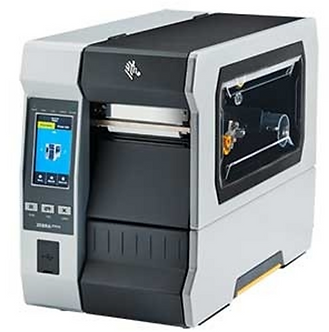
Representative RFID printer encoder

Printer role

What an RFID printer does

An RFID printer prints human-readable text, graphics, or barcodes on a label while also encoding the RFID inlay inside that label. The result is a physical label that can be read visually and electronically.

Printer selection depends on label size, RFID inlay position, encoding requirements, print volume, ribbon and material choices, verification behavior, and software data flow.

Workflow

Print, encode, and verify

  1. Receive label data
  2. Print text, barcode, or graphics
  3. Encode EPC or required RFID data
  4. Verify the encoded inlay
  5. Handle bad tags or rejected labels
  6. Associate the label with a software record

Label design

Human-readable, barcode, and RFID in one label

Many RFID labels still need printed text and barcode data. The visible label helps users with exceptions, manual checks, shipping documents, cartons, product tickets, and workflows where RFID is not the only identification method.

Encoding

EPC data and commissioning

Encoding should follow a defined identifier strategy. The EPC or encoded value should map cleanly to the item, asset, carton, document, or shipment record that software will use.

Media fit

Inlay position, calibration, and bad-tag handling

RFID printers need the right label construction and calibrated inlay position so the printer can encode the chip reliably. Some labels, especially specialty or on-metal constructions, may have printer compatibility limits.

The workflow should define what happens when a tag fails encoding or verification. Bad tags should not silently enter the population if the downstream system depends on them.

Printer selection

Desktop vs industrial RFID printers

Desktop printerUsually a fit for lower-volume label production, office workflows, pilots, and controlled commissioning tasks.
Industrial printerBuilt for higher print volume, larger media rolls, tougher environments, and repeated production use.
RFID mediaThe printer, ribbon, label material, inlay size, and inlay position must work together.
Software workflowThe printer needs data from a business system, Rocket Print, a label template, or a commissioning process.

Software

Integration with software and business data

RFID printing is often a data problem as much as a hardware problem. Label templates, encoded values, product data, shipment data, asset records, order records, and exception workflows need to be coordinated.

Rocket Print is the Rocket RFID software path for print-job workflows. This page focuses on printer and encoder hardware selection. For other software products, see RFID software.

Alternative

When pre-encoded tags may make more sense

Some projects do not need in-house RFID printing. Pre-encoded labels or tags may be better when volumes are predictable, label content is simple, the workflow does not require on-demand printing, or a supplier can encode and verify tags before shipment.

Rocket RFID can help compare in-house printing against sourced, pre-encoded, or project-specific tag options.

RFID printers

Choose the Right RFID Printer and Encoding Workflow

Share label size, print volume, RFID media, encoded data, software source, verification needs, and environment so Rocket RFID can recommend current printer and tag options.